Friday, 30 of November of 2007

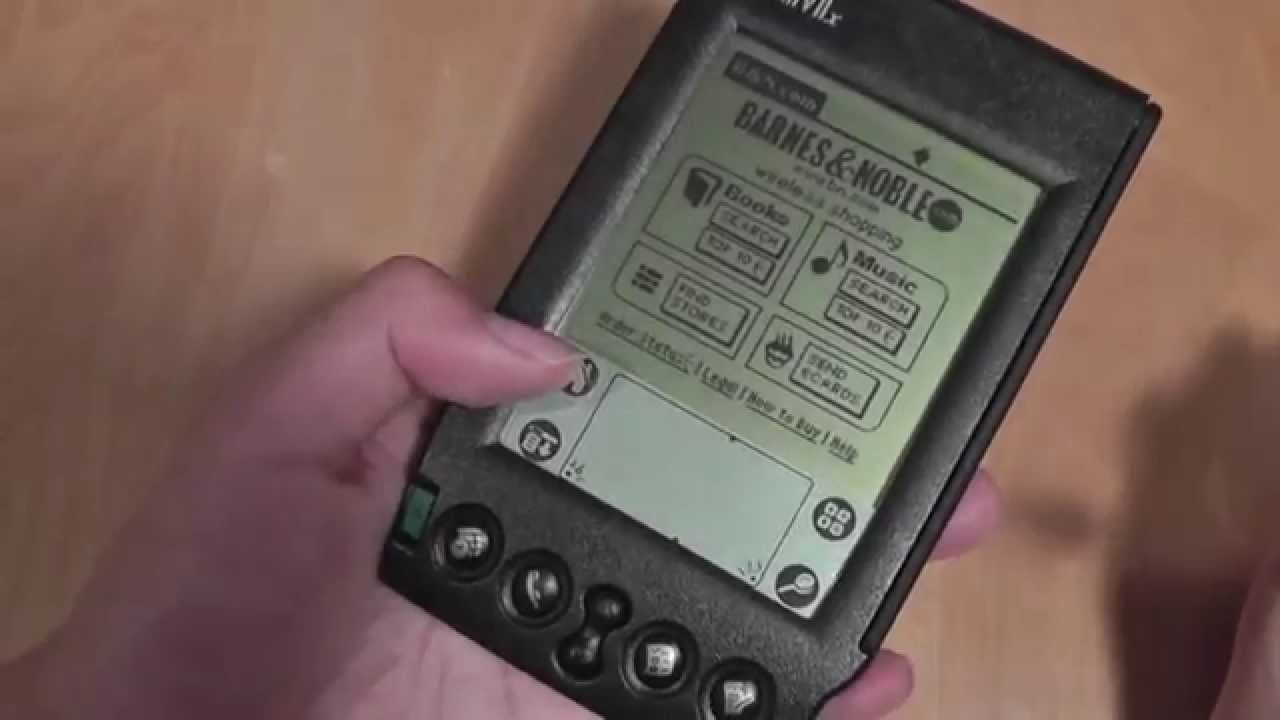
Hard reset of a Palm TX with the button of spoiled ignition

With the daily use, the button of ignition of the Palm can get to let work. This disables, for example, doing hard reset, since it is necessary to press this button to initiate the process. Programs that solve the problem, like the call exist, in a show of originality, Hard Reset, or Sleep, that allow to assign the function of the button of extinguished to another button which we choose.

The ignition button is a part very prone to fail
with the use
The ignition button is a part very prone to fail with the use

But MrAnderson proposes in his blog to us a peculiar way to obtain the same result, that is only possible in case the our Palm, with the spoiled button of extinguished, between in an infinite curl of reseteos. As it can be seen in this video, with this method is able to leave this bulce of resets infinitely, that in the case which we treated (spoiled button) would be non-recoverable:

As we can read in his blog, the steps to be able to initiate hard reset when the Palm is beginning, are the following ones:

  • Manten pressed the four bellboys of Fast Applications (House, Calendar, Contacts and Web).
  • When the bar of progress of the first screen arrives at the 100%, mantendra asi until you loosen the four bellboys in form synchronizes.
  • Loose bellboys and when the Palm changes to the following screen with the gray logo that says "Palm Powered", returns to press the four bellboys of Fast Applications.
  • Delay the a few second and loose four bellboys in form synchronizes. If you did everything correctly it showed a screen to you that says "This safe one to want to erase all the data".
  • Reset presses the key upwards to complete hard.

The effectiveness of this method is not very clear, since the instructions in the original article are not too clear either. To MrAnderson it did not work to him, to some readers of blog of TamsPalm yes. In principle the trick took control of a T|X, but I do not know if it will work with other equipment. Those that you animate yourselves to prove, you leave in the commentaries the result of your experiment, to see if we left doubts.

Monday, 26 of November of 2007

It leaves Lemmings them invade your Palm

We already know how to play in our Palm many emblematic games of PC: Quake, Doom, Duke Nukem, SimCity… let us add to the list one more, in addition one to most addictive: Lemmings. Perhaps for youngest, than they do not know it, we see that the Wikipedia says on this game:

Lemmings is videojuego for the computer Commodore Amiga, designed by DMA Design and published by Psygnosis in 1990.

The game locates between puzzle and the strategy in real time, and consists of controlling to units (lemmings) leading them through diverse obstacles (precipices, walls, montañas…) and with the objective to arrive at a final position. These units are enabled to make a series of actions, between which they count the one to construct stairs, to block the passage to others lemmings, to airdrop, etc. Also they have the option to commit suicide (one assumes that for the case that or impossible to finish the game having lost too many lemmings).

The already inmortal first level of Lemmings

Lemmings caused rage when it was sent, and world-wide is known. What perhaps as much people do not know is what is really lemming, and what really has of certain its fame of “suicida”:

Lemming is a rodent that live in the tundras, in taiga and Arctic prairies, the north of the American continent, and in some regions of Eurasia, that feeds itself mainly on grass, roots and fruits. Its cycle of reproduction is characterized being enough short, which together with the great fertility of the females produces frequent demographic explosions of the species, which they are compensated partly by the performance of predators and the food shortage at certain times. This mammal constructs to tunnels and wells, which serve like madriguera and deposit to him to make the food supplying.

The myth exists of which lemmings commits suicide in mass like part of a self-regulation mechanism of the nature. Nevertheless, resemblance thing is not demonstrated and it is considered that these deaths take place accidentally, due to impronta genetic that has this rodent and that determines its sense of the direction during the migrations. Its biological instinct induces to invariably move in a direction or concrete route to him, that is independent of the topológicos and climatic changes that can be produced in their ecosystem of natural form or by the hand of the man. Sometimes this causes situations in which the groups of lemmings hurry invariablemete towards a river, a precipice or any other accident on the land.

The documentary one of Disney White Wilderness, winner of the Oscar, remarkably contributed to maintain this myth.

From the appearance of lemmings original, the saga has not done more than to grow, and in fact she has arrived to the present time, since a version for Sony PSP has become even.

The version of Lemmings for Palm recreates the original one for PC faithfully. So much with stylus can be controlled as with pad directional, it supports to screens monochrome color or, effects of sound and background music, and memory card to even store the levels.

Some captures of the version of Lemmings for 
Handspans A Lemming digging
The levels of Lemmings are to as more original A Lemming on the verge of exploding
Some captures of the version of Lemmings for Handspans

In the page of unloadings where we can lower the Lemmings for Palm, they inform to us that any superior Palm with Handspans 3,1 or, and screen of 16 colors will be able to execute the program. The following equipment is not supported therefore: Tapwave Zodiac, Pilot 1000, Pilot 5000, Personal Palm, Palm Professional and IBM Workpad 10U. But any moderately recent Palm will execute it without problems.

This program is of gratuitous unloading, and brings the initial levels including. But if we want to play all the levels that exist for Lemmings we will have to buy them.

For which the nostalgic vein has waked up them, or simply they finish discovering this game, I recommend the totally complete page Lemmings Univer, where everything can be found on the Lemmings: tutorial, codes of level to go directly to the level that we want, unloadings, and until images done by fans. And it is that few games created so many addict ones as Lemmings. It is hour to redescubrir it in your Palm.

Monday, 19 of November of 2007

It executes programs of Handspans in Windows Mobile or Symbian

The other day we spoke on the new virtual machine that ACCESS has developed for the Nokia of series N. But this is not the only way to execute programs of Handspans in machines with another operating system. For a long time we have been having StyleTap, a program that does this same one but for apparatuses that run Mobile Windows. As we saw, the park of applications for Handspans arrives at 30,000, and would be a complete waste not to be able to take advantage of them in other equipment. It is more, many of these applications cover a specific necessity that surely never cover in another operating system for movable device is seen.

StyleTap can execute thousands of Palm 
applications in Mobile Windows
StyleTap can execute thousands of Palm applications in Mobile Windows

The applications for Palm are very many that StyleTap can execute. In general, if a nonutliza application conduits of HotSync (to synchronize information with the PC), nor hacks outside the API of HackMaster, and does not try to accede at low level to the registries of the Palm, surely it works without problems in StyleTap.

StyleTap in concrete can be executed in Windows Mobile 6,0, Windows Mobile 5,0 for Smartphone, Windows Mobile 5,0 for Pocket PC, Mobile Windows 2003 for Pocket PC, Pocket PC 2002 and Pocket PC 2000. It is possible that in a future they appear versions of StyleTap for iPhone and the Android platform. For Mobile Windows, two versions of StyleTap exist, oriented to different equipment:

  • StyleTap for Windows Mobile PocketPC is designed for apparatuses that have a touch screen and stylus, for example Treo700w/700wx, HP iPAQs, Dell Axim, and many HTC.
  • StyleTap for Windows for Mobile Smartphone, on the other hand, is thought for equipment that does not have touch screen and stylus, but of a navigator of five directions, that is to say, Windows Mobile Smartphone like Motorola Q, Samsung Blackjack, and T-Mobile Dash.

StyleTap also allows to emulate games of 
Handspans
StyleTap also allows to emulate games of Handspans

The installation of applications Handspans in equipment Mobile Windows with StyleTap is simple. In the PC a called program StyleTap Application Installer settles. This program is in charge to install correctly in the PDA the archives prc/.pdb being used ActiveSync, so that later StyleTap executes them. In order to install programs from MacOS or Linux, we will not be able to use the Application Installer, but the process is equally simple: the necessary archives are placed prc/.pdb in the directory of the data base of StyleTap (in the PDA Mobile Windows), that by defect is “\Program Files\StyleTap\db”. In order to transfer them to that directory a memory SD can be used, to unload them by the connectivity wifi or bluetooth of the PDA, or to transfer them by infrared.

StyleTap for Symbian emulating the Bike game or 
Die
StyleTap for Symbian emulating the Bike game or Die

It is possible to also emphasize, that it exists a version of StyleTap for Symbian UIQ and Series 60 in advanced development state, in fact has announced yesterday officially that is going away to send to the market in a future. We can see a beta version in operation in this video that Tam Hanna de TamsPalm recorded in the Symbian Smartphone Show a month ago. In particular, the Bike game is being executed (addictive ) or Die in a Sony Ericsson m600i:

In order to be to as much of útlimas the new features in the development of StyleTap, blog is available his official.

Tuesday, 13 of November of 2007

Now your programs of Handspans/GarnetOS work in the Nokia Nseries

Today it has surprised, rather cheered to me, to read the opinion of fportillo, expert in all type of pocket computers that collaborate in blog of Serantes. The chance has made him use an equipment with Handspans again, in concrete a TX. And its opinion is this one:

Whenever I return to Handspans I give to account of the enormous advantages of this operating system and the complete tools that incorporate. The incredible continuous Doc2Go being of the best tools to work with Office documents and to visionar is them nothing like the Picsel Proview, that together with the Picsel Browser turns the Palm a tremendously productive tool, without forgetting his you even magnify possibilities of synchronization with any system, by WIFI, although Microsoft says that he does not incorporate it in his ActiveSync to be uncertain.

Simple, productive and effective programs. Stable and functional systems. After all, efficiency. That is we must request to him to a PDA of work and that is those that give Handspans. That is what I admire of this system and that profit not to find in the others, perhaps so that we are costumary animals.

Existing software for Handspans, result of years and years of existence of this excellent platform, is of a quality and apabullante amount, as we can see every day in this blog. It would be a pity, and a bad decision, to throw to the sweepings all these programs. And he is something that the ACCESS people know very well: like developer of ACCESS Linux Platform (ALP), the new operating system that will replace Handspans, incorporates in him a virtual machine that will be able to execute the applications created for the very old but effective operating system. The newness, nevertheless, is that they have not remained there.

A Nokia N810 executing the virtual machine Palm 
Garnet OS
A Nokia N810 executing the virtual machine Palm Garnet OS

In alliance with Nokia (thanks for the commentary chusquete), they have created a version of this virtual machine for products of series N, that is to say, the Nokia N810, Nokia N800 and Nokia N770. Nokia needs to populate with the good software its equipment to have the welcome of the necessary public, and ALP needs that the public between in contact with GarnetOS, Handspans, or as we want to call it, so that its platform ALP has necessary the critical mass at the moment of the launching. And it is that although I do not doubt that will appear much software for ALP, in the beginning most of software that we will be able to install in the new equipment of Palm will be the existing one for Handspans.

Garnet VM enables Nokia Nseries users to run thousands of Garnet OS (formerly Palm OS®) applications. Popular Garnet VM supports some of the most applications in the mobile market including, Google Maps, Snappermail®, popular DateBk5 and perennially games like Bejeweled®, PacMan and Sudoku. Choose from to wide variety of application types including, document processors, database managers, messaging, enhanced PIMs, life management tools, and dwells.

In the page of ACCESS dedicated to this virtual machine Garnet OS for Nseries we can see more information on the matter, like a list with some of the applications already totally supported:

  • Web/E-Mail: Google Maps, Snappermail.
  • Networks: WiFile Pro, EzFTP.
  • Multimedia: Pocket Tunes, Kinoma.
  • Productivity: DateBk5, Britannica Encyclopedia.
  • Games: Bejeweled, PacMan, Raging Thunder, Village SIM.

Bejeweled, the famous game of Palm OS, in a 
Nokia N810
Bejeweled, the famous game of Palm OS, in a Nokia N810

The characteristics of this virtual machine are the following ones:

  • Integrated applications: Address, Dates Book, Pad Memo, Calculator.
  • Requirements: 3.5MB of ram for feasible and the 16MB of ram for storage (configuration between 1MB and 32MB).
  • The thrower allows: instalación/desinstalación of applications, configuration of compatibility by application (memory, resolution, model of equipment to emulate), configuration of space of storage available to emulate, configuration of screen (rotation of screen, image of bottom).
  • General characteristics: inlet area with recognition of writing Graffitti 1, networks (TCP/IP), synchronization by hotsync, multilanguage (English, French, Italian, German and Spanish).

Forming the size of the memory and the bottom of
screen
Forming the size of the memory and the bottom of screen

Also the memory can be chosen heap and model to 
emulate
Also the memory can be chosen heap and model to emulate

There is more information available on the matter of this virtual machine in white to paper that ACCESS has published, as well as some notes on its use in this page of frequent questions.

The very good news for which we lamented every day the disappearance of Handspans and fear that ALP is only in an attempt of something great. I hope that ACCESS continues establishing alliances to be able to plant face to Microsoft and his Mobile Windows, since the competition is something that always is going to us to benificiar to us, the users.

Monday, 12 of November of 2007

Linux running in a Palm TX

The development of the versions of Linux for the Palm advances to good rate. For example, a distribution for Palm with good state of maturity is Angstrom, cradle in Gentoo Linux and with versions for Palm TX and Tungsten T5. As graphical surroundings use Opie, fork of Qtopia focused to the PDAs.

Opie executing itself in a Palm TX

If you have used Linux sometimes, surely you have proven the graphical surroundings KDE and Gnome. For example Ubuntu uses Gnome, and Kubuntu KDE. Then bién, Qtopia is the base of graphical surroundings KDE, reason why Opie and KDE are we say “hermanos”. Although it is not used in Angstrom, is worthy to mention the other graphical surroundings for PDAs being run Linux, call GPE, that use bookstores GTK, the base of Gnome, another well-known graphical surroundings for Linux. So if in the PC with Linux we counted on the main options of KDE and Gnome like graphical surroundings, in the PDA it happens same com Opie and GPE.

GPE executing itself in a Palm TX

Then, our friend I read has published in his blog a video and screen captures of Opie/Armstrong running in its TX. Part of the time of load of the operating system, around a minute because it is being ***reflxed mng of the SD, not of the main memory, me it has surprised the express that takes the applications, considering the complexity of Linux like compared operating system for example with Handspans. It makes me think that when a vesión of Linux for the Palm optimized for these devices is developed, for example the ALP of Inc. Palm, the result can more be than satisfactory.

New stable version but of Linux for Palm TX, in a single necessary, the single thing package is necessary yet to decompress the content in the Root of card SD, to execute the Cocoboot that will appear in the card of the ready Palm and to be used

The Linux Angstrom of the video can be unloaded of the page of Linux for Palm. the instructions are simple:

  • To unload the complete package (for example “Palm TX (all)”).
  • To decompress the file and to copy it to the root directory of card SD of the Palm.
  • To do backup of the information of our Palm just in case.
  • To execute the program “Cocoboot” that he will appear installed in our Palm, and to do tap in the option “Boot”. This program will reseteará the Palm loading the Linux that we have installed instead of the Handspans that the Palm of factory brings.
  • Linux Will start. To enjoy it. In PDAExpertos we can read the opinion of which they have been it proving.

In order to be to as much of the advances of this Linux for the TX, I recommend to follow blog of its creator.

How our TX with Angstrom/Opie would be seen 
executing itself instead of Handspans
How our TX with Angstrom/Opie would be seen executing itself instead of Handspans

For that they want to prove Linux in his Palm, I read has compiled a list of Questions More frequent than, abusing its amiability, I am going to include here also, for which they have doubts when proving Linux in his Palm:

  • He is safe to load Linux?: , totally single it runs as a program but and with a Reset Soft leaves him.
  • I can return to Handspans?: If, single you must reinitiate the Palm.
  • I do not lose information?: , none single reseteas and you return to as you were. NEVERTHELESS I ADVISE TO MAKE AN ENDORSEMENT BEFORE PROVING.
  • I can use in “X” device the archives that posteaste for “Y” device?: NO, each package is for a specific device TX, T5…).
  • Of where unloading the present version but of Linux for my Palm?: Of Hack&Dev.
  • Can be installed applications in Linux?: No, but it brings a good Seth of Apps so that you entertain yourself.
  • It is possible to be worked single with Linux in the Palm?: Yes, the package of Apps that it includes is enough complete.
  • When resetear the Palm to where goes the changes that I did in Linux, are lost?: NO, they keep in the image of the card, and when bootear Linux it will be your information there again.
  • If my Palm is damaged your me the payments?: Jejeje, I am afraid that no, úsalo under your own risk
  • He is useful to change the operating system of my Palm?: It really depends on your point of view.
  • It is east system what presented/displayed east Acces year, the Acces Linux Platform?: NO, this it is an alternating project to carry Linux to the Palm devices.

Happy hacking!